Production-ready · Pre-revenue · Available for acquisition or licensing
CUI incident reporting, organized around the clock.
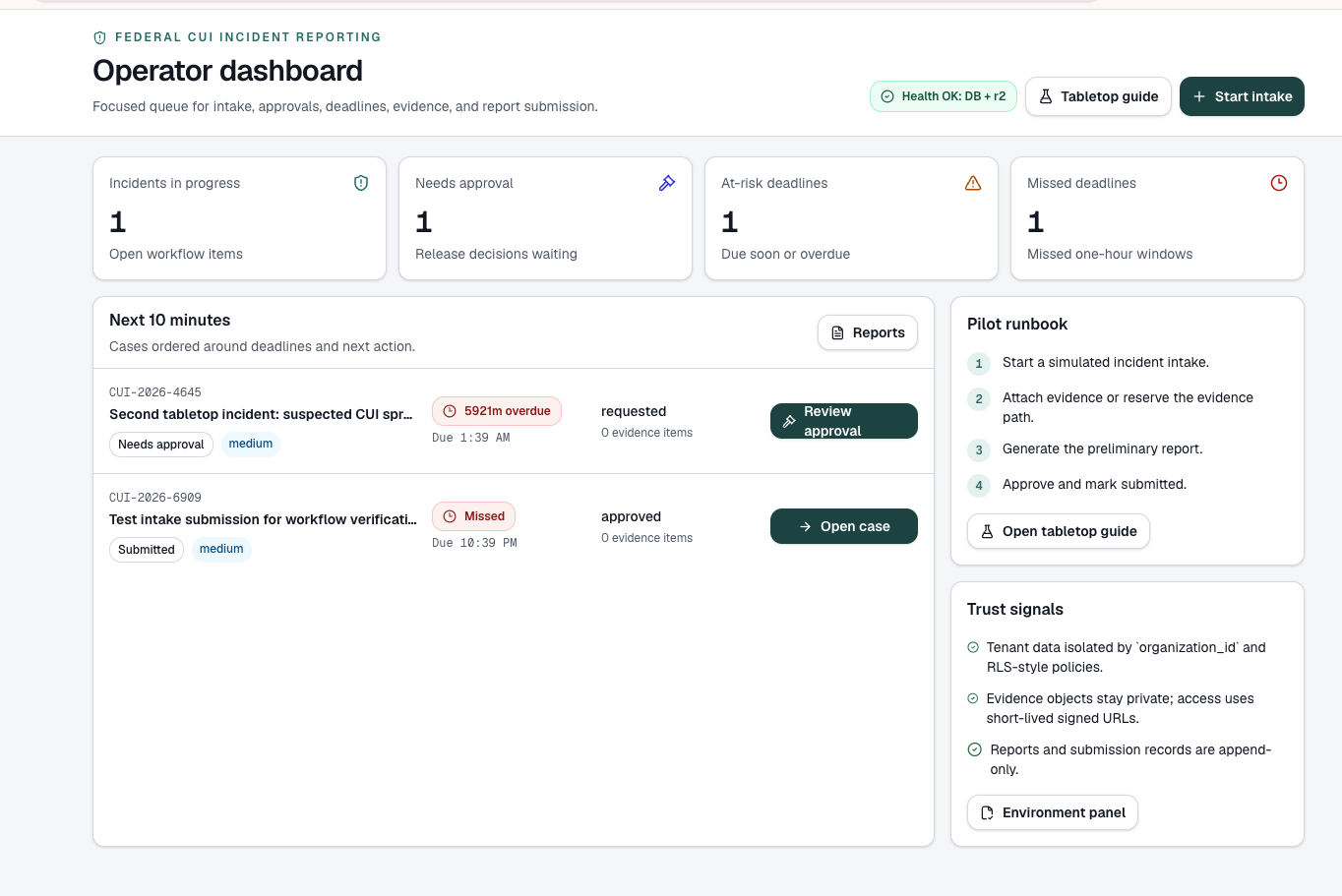
CUIClock gives federal contractors one workflow for incident intake, regulator-specific deadlines, evidence, approvals, reporting, submission tracking, and audit history.
Sandboxed demo. No signup required.
Incident reporting is a coordination problem
CUIClock helps federal contractors manage CUI incident reporting from discovery through documented submission. Between a potential incident and a completed report, teams typically coordinate:
Multiple people
Operators, security leads, approvers, and advisors each own part of the process.
Evidence collection
Logs, files, and notes need to stay attached to the right case.
Internal approvals
Reports are reviewed and released by designated people before submission.
Different reporting windows
Deadlines vary by agency, contract, and incident type.
Submission records
Teams need a record of what was submitted, when, and by whom.
Follow-up reporting
Initial reports are often followed by updates as facts develop.
CUIClock is not a SIEM or full GRC platform. It is the operational workflow between identifying a potential incident and completing the required reporting process.
How CUIClock works
One case record carries each incident from intake to audit history. Deadlines follow agency-specific reporting windows rather than a single fixed clock.
-
1
Discover / intake
Capture the potential incident in a structured intake form.
-
2
Start the applicable clock
Apply the agency profile and its reporting window.
-
3
Collect evidence
Attach supporting files and notes to the case.
-
4
Review & approve
Route the case to designated approvers.
-
5
Prepare report
Generate preliminary and follow-on reports from case data.
-
6
Track submission
Record what was submitted, when, and by whom.
-
7
Maintain audit history
Keep a timestamped history of every action on the case.
Key capabilities
Structured incident intake
Guided fields capture reporting details from the first entry.
Agency-specific deadline profiles
Profiles for DoD, GSA, DHS, and multi-agency environments set each case's reporting window.
Evidence management
Keep supporting evidence with its case, visible only to authorized reviewers.
Role-based approvals
Designated reviewers approve report versions before they are submitted.
Preliminary and follow-on reporting
Prepare an initial report, then follow-on updates from the same case.
Submission tracking
Log each submission and its status against the applicable deadline.
Audit history
A timestamped record of intake, approvals, report versions, and submissions.
Multi-tenant role-based access
Each organization's cases are separated, with roles for operators, approvers, and administrators.
Designed around the frameworks contractors already work within
CUIClock's workflow was designed with the federal CUI Program (32 CFR Part 2002), DFARS 252.204-7012, the emerging FAR CUI rule, and NIST SP 800-171 incident-handling requirements in mind. Reporting deadlines and obligations come from the applicable agency and contract requirements. CUIClock organizes the reporting process; it does not provide legal advice or guarantee compliance.
Who it's for
Teams that report CUI incidents, and the companies that serve them.
Federal contractors
Organizations handling CUI that need a repeatable reporting workflow.
CMMC / NIST 800-171 consultants
Advisors who want a practical incident-reporting tool to offer clients.
MSPs and MSSPs serving the Defense Industrial Base
Providers that could deliver incident reporting as part of a managed service.
Cybersecurity and incident-response firms
Firms that could pair response work with a documented reporting workflow.
GovCon technology companies
Platforms that could add CUI incident reporting as a product line.
GRC / compliance software vendors
Vendors extending from compliance posture into incident-reporting workflow.
See the workflow in the sandboxed demo
Walk through a simulated CUI incident from intake to submission using sample data. Nothing to install.
Explore the Sandboxed DemoNo signup required.
Suggested walkthrough
- 1Start a simulated incident intake.
- 2Attach evidence to the case.
- 3Generate the preliminary report.
- 4Approve it and mark it submitted.
Frequently Asked Questions
A SIEM detects security events, and GRC platforms such as Drata, Vanta, or Hyperproof manage overall compliance posture over months. CUIClock covers the workflow in between: from identifying a potential CUI incident through documented submission and follow-up.
Deadline profiles cover DoD, GSA, DHS, and multi-agency contracting environments. Reporting windows vary by agency and contract, so each case uses the profile that applies to it.
No. CUIClock organizes deadlines, evidence, approvals, and records for the reporting process. Each organization remains responsible for determining and meeting its own reporting obligations.
Actions on a case, including intake, approvals, report versions, and submissions, are recorded with the user and a timestamp. Report versions and submission records are retained rather than overwritten.
CUIClock is production-ready and pre-revenue. It is available as a software asset for acquisition or licensing, and the sandboxed demo shows the core workflow with sample data.
CUIClock is available for acquisition or licensing.
CUIClock is a production-ready, pre-revenue software asset. E&F Compliance Services is open to discussions involving full acquisition, exclusive licensing, or commercial licensing.
A transaction can include
- Source code
- The existing application
- Buyer handoff documentation
- Deployment and technical documentation
- Brand and domain assets, subject to transaction scope